Running OpenClaw on GPU improves speed, supports larger models, and enables smoother automation. It helps OpenClaw run more efficiently and reliably.
This guide explains system requirements, GPU setup, local model configuration, and best practices.
System Requirements for OpenClaw on GPU
| Component | Minimum | Recommended |
|---|---|---|
| GPU | 6GB VRAM (GTX 1660 / RTX 2060) | 8GB–16GB VRAM (RTX 3060+) |
| RAM | 8GB | 16GB+ |
| CPU | 4 cores / 4 threads | 8 cores / 8+ threads |
| Storage | 20GB SSD free | 40GB–60GB SSD |
| OS | Linux / Windows 11+ / Ubuntu 22.04+ | Ubuntu 22.04+ |
| Node.js | v22+ | Latest version |
| Model Backend | Ollama | Ollama (recommended) |
| GPU Drivers | NVIDIA CUDA / AMD ROCm | Latest drivers |
If your system doesn't meet these GPU requirements, you can skip the hardware setup and run OpenClaw instantly on Ampere.sh.
Recommended Models by VRAM
| VRAM | Model | Pull Command |
|---|---|---|
| 4–6 GB | Llama3.2 3B / Gemma3 4B | ollama pull llama3.2:3b |
| 6–8 GB | Qwen2.5 7B / Mistral 7B | ollama pull qwen2.5:7b |
| 12–16 GB | Llama3.1 8B / DeepSeek-R1 8B | ollama pull llama3.1:8b |
| 20–24 GB | GPT-OSS 20B / Qwen2.5 32B | ollama pull gpt-oss:20b |
| 48 GB+ | DeepSeek-R1 70B / Llama3.1 70B | ollama pull deepseek-r1:70b |
RTX GPUs provide the most stable and fastest OpenClaw experience.
How to Install OpenClaw on GPU — Step by Step
Step 1: Install WSL (Windows Only)
If you are on Windows, open PowerShell as Administrator and run:
wsl --installRestart your PC, then open WSL to confirm it is working:
wsl --version
wsl
Linux and Ubuntu users can skip this step entirely.
Step 2: Install NVIDIA Drivers
Check if your GPU is already detected by running:
nvidia-smiIf the command is not found, install the NVIDIA drivers and reboot:
sudo apt update
sudo apt install nvidia-driver-535 -y
sudo reboot
After reboot, run nvidia-smi again. You should see your GPU name, VRAM, and driver version:
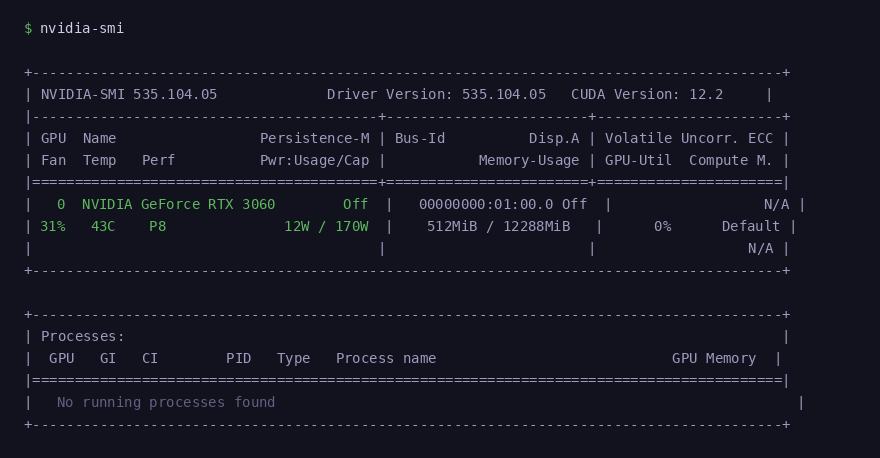
nvidia-smi confirming GPU detected — RTX 3060, 12GB VRAM, CUDA 12.2
Step 3: Install Ollama
Run the official Ollama installer:
curl -fsSL https://ollama.com/install.sh | shVerify the installation completed successfully:
ollama --version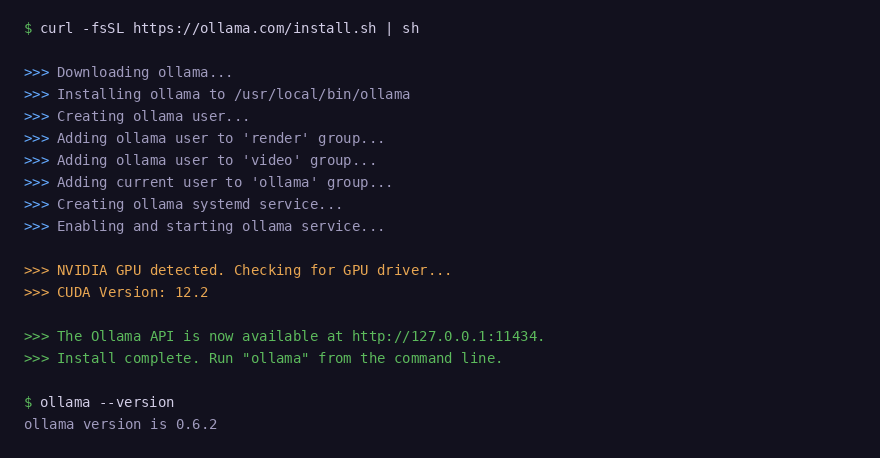
Ollama detects your NVIDIA GPU and CUDA version automatically during install
Step 4: Pull a Local Model
Choose a model based on your available VRAM:
# 4–6 GB VRAM
ollama pull llama3.2:3b

# 6–8 GB VRAM
ollama pull qwen2.5:7b

# 12–16 GB VRAM
ollama pull llama3.1:8b

# 20–24 GB VRAM
ollama pull gpt-oss:20b
Run the model to confirm it loads correctly:
ollama run llama3.1:8bIn a second terminal, confirm your GPU is being used during inference:
watch -n 1 nvidia-smi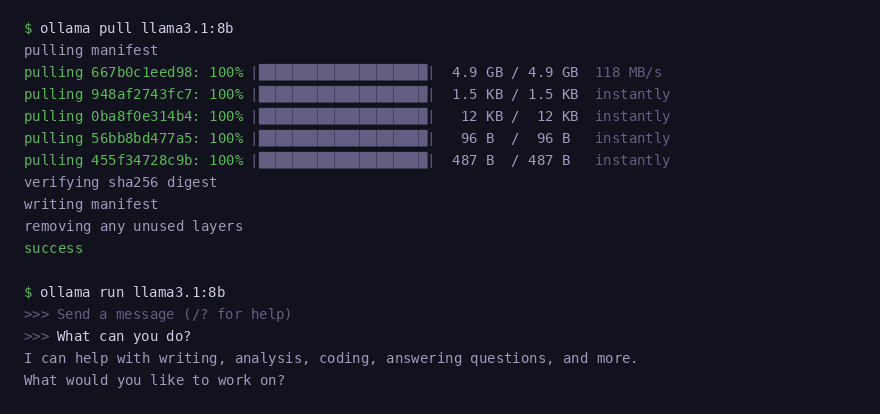
Model download completes layer by layer — model responds immediately after
Step 5: Install OpenClaw
Run the OpenClaw install script:
curl -fsSL https://openclaw.ai/install.sh | bashThe installer detects your OS, installs Node.js 22, and sets up OpenClaw automatically.
Step 6: Configure OpenClaw to Use Ollama
Run the onboarding wizard — this is the easiest way to connect Ollama:
openclaw onboardWhen prompted, select Ollama as the model provider and choose your mode:
- Local — uses only your GPU models, no cloud calls
- Cloud + Local — combines your GPU models with cloud providers
Or configure it manually if you prefer:
openclaw config set models.providers.ollama.apiKey "ollama-local"
openclaw models set ollama/llama3.1:8b
To see all available models at any time:
openclaw models listStep 7: Start OpenClaw
Start the OpenClaw gateway:
openclaw gateway startCheck that it is running:
openclaw gateway statusOpen the dashboard to confirm your local Ollama model is the active provider:
openclaw dashboardConnect a Messaging Channel
Inside the dashboard, go to Channels and connect Telegram, WhatsApp, Discord, or any other supported platform. Your messages will now be handled by the local AI model running on your GPU.
Common Issues and Fix
GPU drivers, CUDA errors, VRAM limits, and model compatibility can slow down your setup. Instead of troubleshooting hardware problems, you can run OpenClaw instantly using Ampere.sh.
Frequently Asked Questions
Can I run OpenClaw on GPU?
What is the minimum GPU requirement for OpenClaw?
Can I run OpenClaw on NVIDIA RTX GPUs?
Can I run OpenClaw without local models?
Can I use a gaming PC to run OpenClaw?
Can I run OpenClaw on a cloud GPU?
Why is my GPU memory full?
Don't Have a Powerful GPU?
Running OpenClaw on GPU requires high VRAM, drivers, and setup. If your system doesn't meet the requirements, run OpenClaw instantly on Ampere.sh without any hardware setup.
Get Started on Ampere.sh →